How MassageHub Ranks Listings: VIPs and the New Homepage
9 October 20269 min readProvider GuideVIPListing RankingMassageHub
Key takeaways
Paid listings always come first on MassageHub, and listings whose paid period has ended, with contacts hidden, come last. On city, area, service and search pages, the listing paid for most recently comes first among the paid listings.
On the homepage, the VIPs and the whole Paid group are reshuffled about once a minute and whenever a listing changes. For the first 5 days after each payment a listing’s weight is doubled, so a listing paid today is about six times as likely to be shown first as one paid two months ago.
On the homepage, the Verified badge and a rating of 4.5 or more from at least three reviews give a paid listing a slightly better chance in the reshuffle. Neither moves a listing into another group, and neither changes the order on city, area, service or search pages.
Every VIP is still on the first page of the homepage, before “Show more”: two VIPs open the feed, and the rest follow in blocks of four after every four regular cards.
City, area, service and search pages are not reshuffled. They keep a fixed order, with a VIP block above the other listings on the first page.
From 9 October 2026, MassageHub ranks listings on the homepage in a new way, the biggest change to the order of the site since launch. The basic rule stays as it was: paid listings always come first, and listings whose period has ended come last. Among the paid listings, the homepage now reshuffles listings about once a minute, and recently paid listings come out on top more often. VIPs no longer sit in one block above everyone else; they run through the first page in blocks. City, area, service and search pages keep their fixed order, with the VIP block on top. Prices are in MassageHub advertising prices explained.
What changed on the homepage, and why
The old homepage worked like a queue. Every VIP sat in one “VIP Therapists” block above all the regular cards, and the order mostly moved only when someone paid, a new listing went live or a paid period ended at noon. Two providers paying the same £24.99 listing fee could get very different exposure just because one paid a week later.
Looking for a therapist?
Browse verified massage therapists across the UK — incall & outcall, all services.
The new homepage keeps the rules about who comes first but shares out the top places. In the feed, “Therapists across the UK”, below the search box and the Available today strip, VIP blocks and regular blocks take turns.
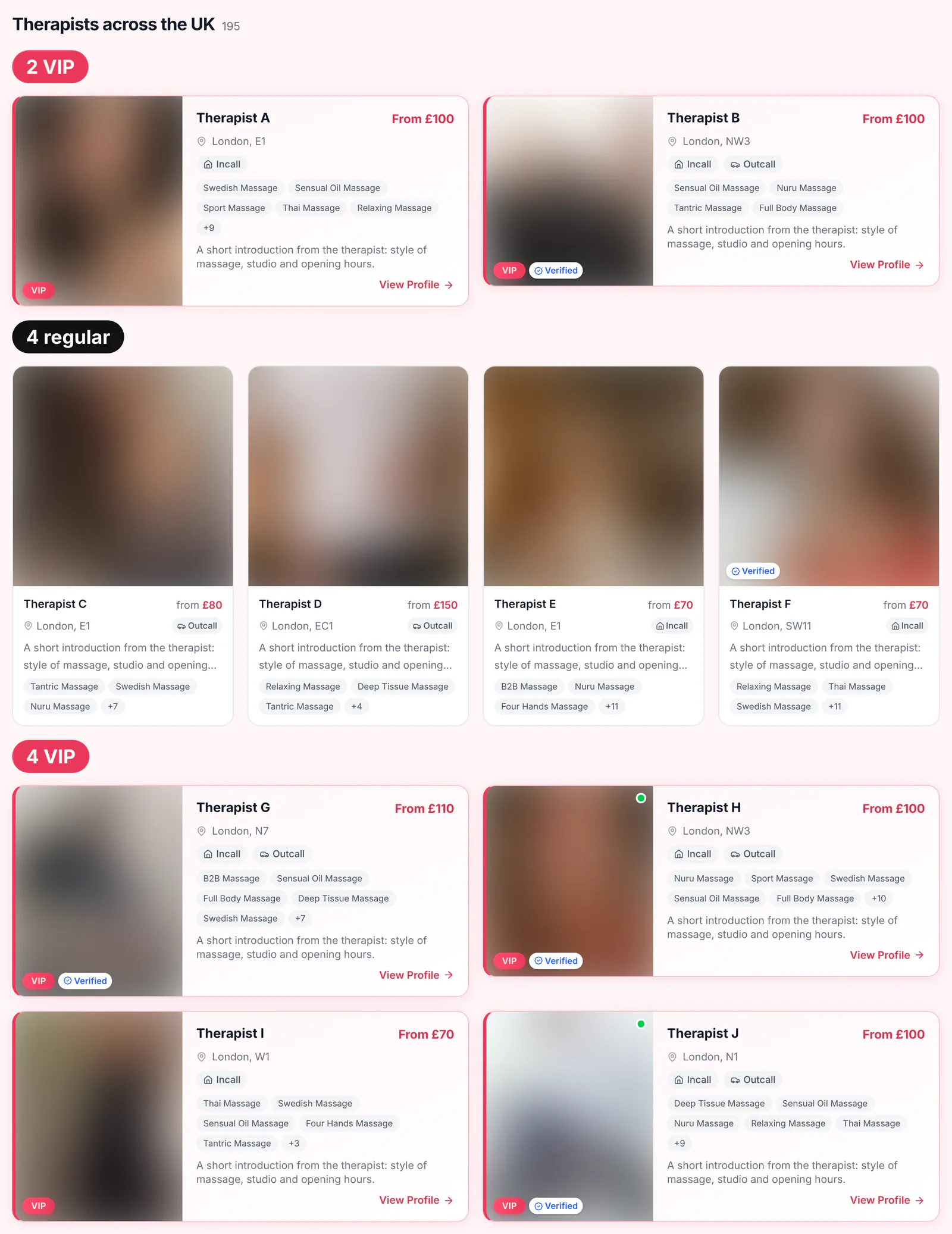
The new feed on a desktop: 2 VIP, 4 regular, 4 VIP, then 4 regular, 4 VIP and the rest. The screenshots in this article come from our test site. Photos are blurred, and names, areas, prices, ratings and service tags are replaced with placeholders; the coloured labels are ours.
If you pay for VIP: what you keep, and what changed
Until now, VIP put you at the very top of the homepage, and that is what many of you paid for. Here is plainly what VIP gives you now:
Every VIP is on the first page of the homepage, before “Show more”, however many VIPs there are.
The feed opens with two VIPs, and a block of four VIPs follows every four regular cards.
A bigger, highlighted card: pink frame, VIP label, a larger photo on phones, and half a row on a desktop, where a regular card gets a quarter.
VIPs come first in the Available today strip, with a gold star, on the days you switch Available today on.
The VIP block above everyone else on the first page of city, area and service pages and search results, as before (with a limit on UK-wide service pages and in search, explained below).
First in postcode and “near me” searches inside the search radius, nearest first.
On the homepage, three things are different. The single VIP block above all the regular cards is gone. Only two VIPs open the feed, so with ten VIPs the other eight sit below four or eight regular cards, and paid regular listings can appear above them. And the two opening places now rotate between VIPs, instead of always going to the VIP whose listing was paid or renewed most recently.
We made the change because ten near-identical cards in a row are easy to scroll straight past. A VIP card between ordinary cards is bigger and pinker than its neighbours and much harder to miss. We also looked at a VIP carousel and at showing only four VIPs, and turned both down because most VIPs would have dropped out of sight.
Your place among the VIPs follows the same weight as everyone else’s, explained below: how recently your listing period was paid, the Verified badge and your rating. Buying VIP doesn’t change that weight.
VIP days can run past the end of your listing period. If the period ends while your VIP is still running, your card drops behind every VIP whose period is paid, and your contacts are hidden until you renew. Keep your listing period paid for as long as your VIP runs.
If you bought VIP before this change and it no longer gives you what you paid for, email hello@massagehub.uk with your listing name. A person reads every message, and we will sort it out with you individually.
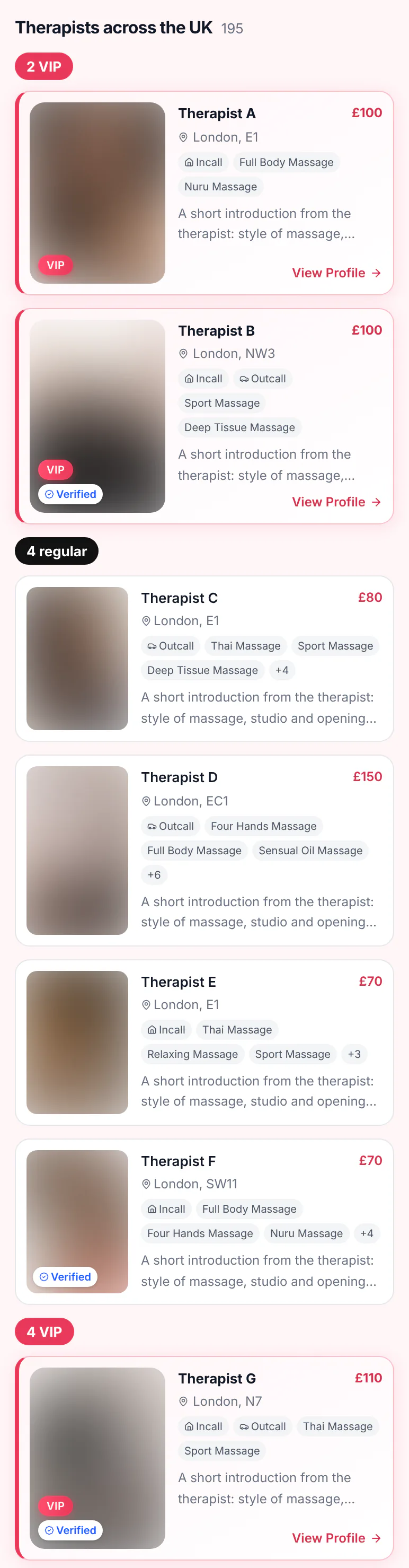
The same feed at the same moment on a phone: two VIPs, four regular cards, then the next VIP block.
How MassageHub ranks listings now: paid listings first
The homepage and the city, area, service and search pages all sort listings by payment status first. Only your payment status moves you up or down here; a badge, a review or VIP never does.
Your listing period is paid: you are above every listing that isn’t. Always first.
Your listing period has ended: your contact details are hidden, and you appear after everyone else until you renew.
Listing periods end at 12:00 London time. Outside the homepage reshuffle, paid listings are ordered “most recently bumped first”. Your listing is bumped when you create it and every time you pay for a listing period, renewals included. Buying VIP and editing your listing don’t bump it.
Inside the Paid group: a weighted reshuffle
Each time the homepage is rebuilt (more on that below), every paid listing gets a weight and the whole Paid group is shuffled, not just the 24 cards before “Show more”, so any paid listing can reach the first page. VIPs are shuffled the same way, in their own list. The weight has four parts:
How recently you were bumped, which normally means your last listing payment; buying VIP doesn’t count. The weight is 3.0 at the moment you pay, about 2.8 a day later, 2.5 after three days, 2.2 after five days, 2.0 after a week, 1.7 after ten days, 1.5 after two weeks and 1.1 after a month, and then levels out at 1.0.
The first 5 days after a payment: the weight is doubled, so a listing that has just paid sits near the top much more often. It is 6.0 at the moment you pay, about 5.6 a day later, 5.0 after three days and 4.4 at the end of day five, then drops back to the normal 2.2 and keeps fading.
Verified: the weight goes up by 20%.
A rating of 4.5 or more from at least three reviews: the weight goes up by another 10%.
A weight is a chance, not a fixed place. Your chance of the top spot is your weight divided by the total weight of your group, so twice the weight makes you twice as likely to get it, but it never fixes your position.
Take four paid listings: one paid today (weight 6.0), one paid ten days ago (1.74) and two paid a month ago (1.1 each). Over many rebuilds, the first comes top about 60% of the time, the second 17% and each of the others 11%. Put just two listings side by side and today’s payment comes out above the month-old one about 85% of the time, while a verified listing comes out above an otherwise identical unverified one about 55% of the time.
What helps your position, and what doesn’t
If your listing is paid, three things improve your chances on the homepage:
Pay or renew your listing period. Every listing payment sets your weight back to the maximum and doubles it for the next 5 days, and renewing early loses no days: they are added to the end of your current period.
Get Verified. A moderator matches a private selfie to your photos; see how verification works.
Collect reviews. Three or more, with an average of 4.5 or higher.
City, area, service and search pages look only at payments and bumps. A listing payment puts you first among the paid listings there, below the VIP block, until someone else pays. Verified and reviews don’t change the order on those pages.
Prices, photos, your description, views, edits, approval and Available today don’t affect the order. Available today puts you in the strip, not higher in the feed. Your profile still decides whether a client calls once they see you, which is what our guide to a winning massage profile is for.
Why the homepage order changes about once a minute
The homepage is rebuilt in the background about once a minute while people are browsing it, and also whenever a listing changes: a new listing, an edit, a photo, a payment, a VIP. Each rebuild draws a fresh order, so the homepage you see now and the one you see a minute or two later will usually start differently.
It isn’t personal. Everyone who opens the homepage between two rebuilds sees the same order, and it doesn’t move while they scroll. “Show more” continues the order the visitor started with, so no card repeats or goes missing.
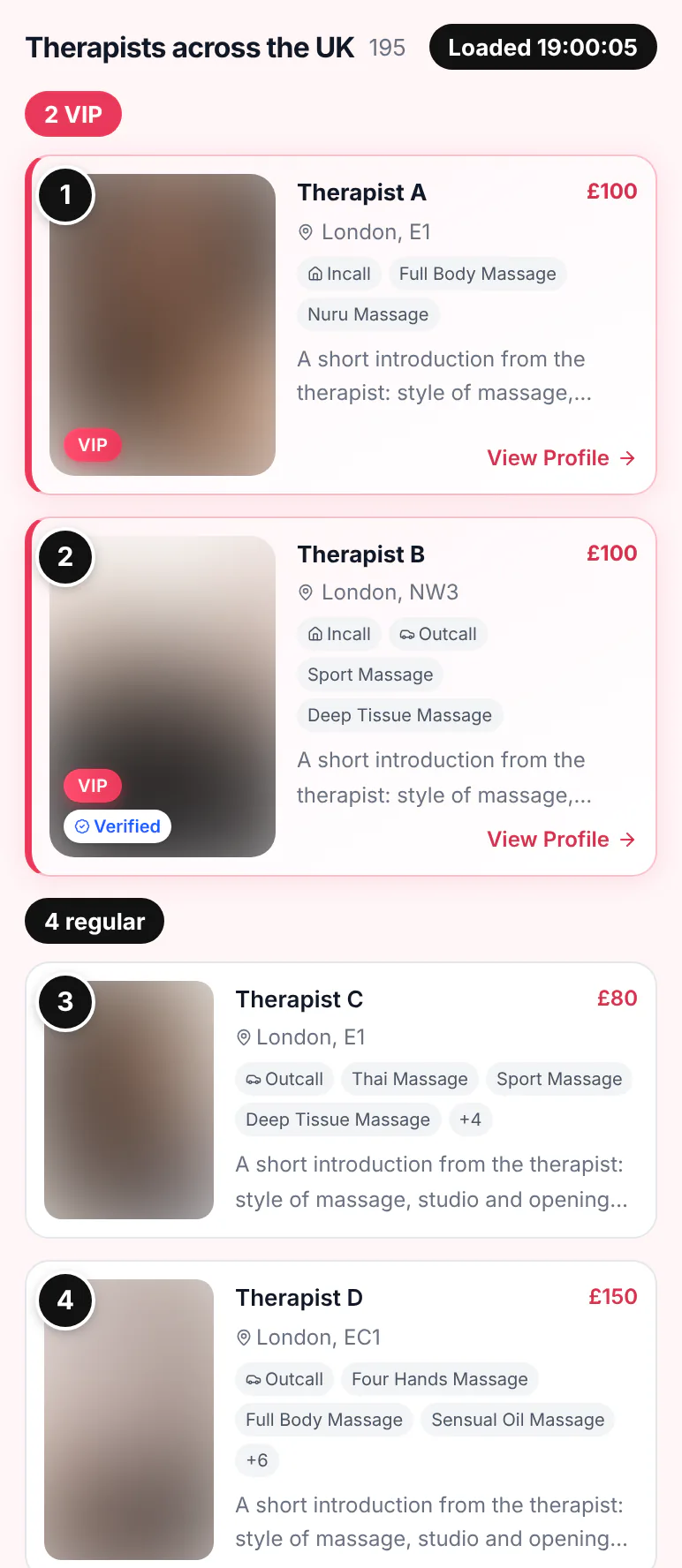
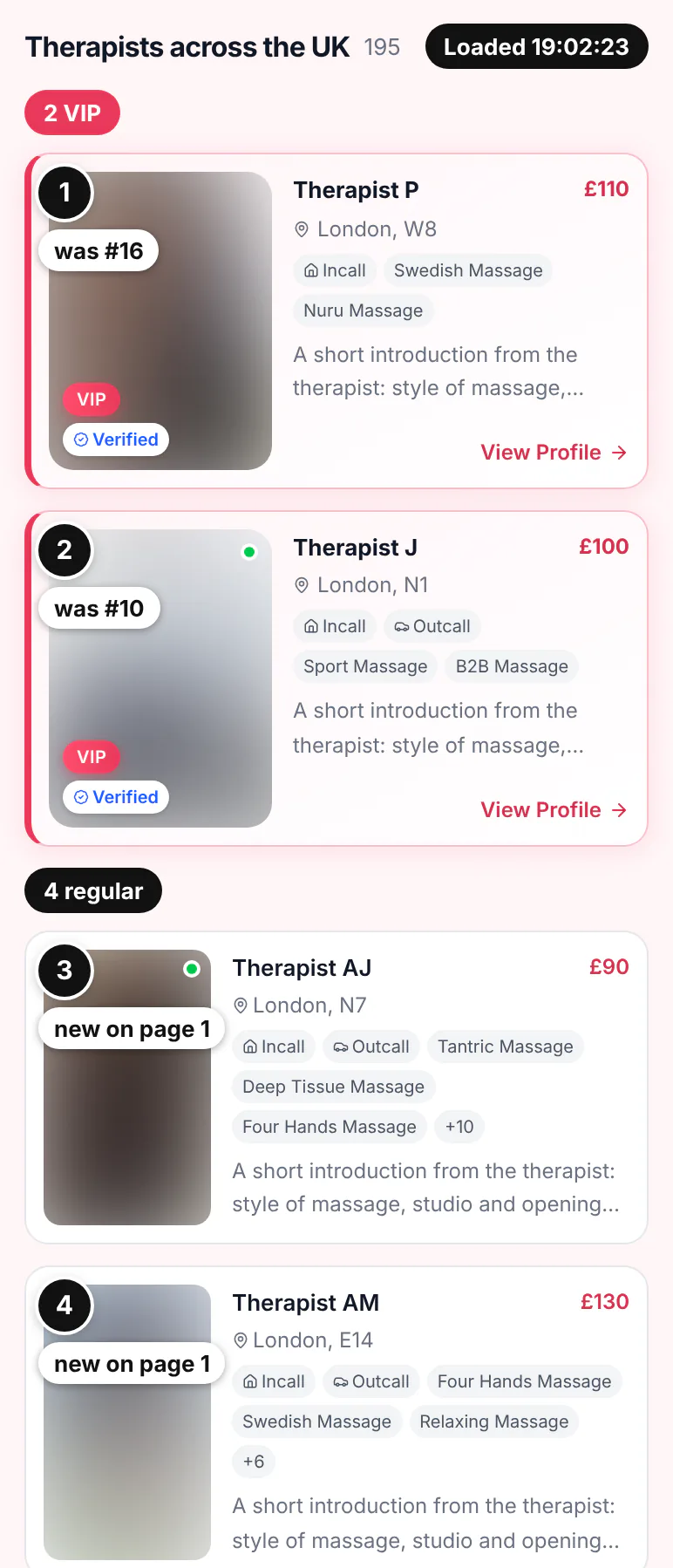
Loaded at 19:00:05 London time: VIPs A and B open the feed, then regular cards C and D. The letters follow this load: A was the 1st card on the page, B the 2nd, P the 16th.Loaded at 19:02:23, after a rebuild: P and J, the 16th and 10th cards before, now open the feed, and A and B have moved to the third VIP block (not shown). The first four regular cards, two of them shown here, had not been on the first page at all.
Listings whose period has ended don’t rotate in the feed. Their contacts are hidden and they stay at the bottom, in a fixed order, until they renew.
City, area, service and search pages keep a fixed order
Only the homepage reshuffles. City pages such as London, area pages, service pages and search results show every visitor the same order: a VIP block on the first page, then the paid listings, most recently bumped first, then everyone else. A fixed order is what stops page 2 repeating page 1. UK-wide service pages show up to six VIPs and search results up to 20, picked in that same order; a VIP beyond the limit doesn’t appear on that page.
The exception is a search by postcode, London area or “near me”. There, VIPs inside the radius come first, nearest first, and then everyone else by distance alone. The default radius is 10 miles.
The Available today strip
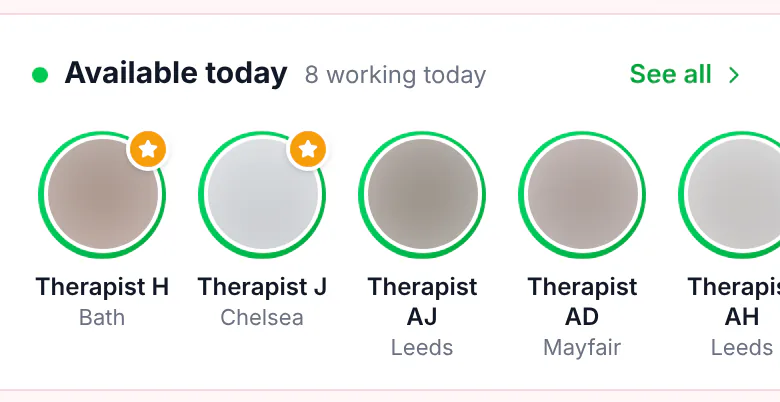
Available today is now one of the most valuable switches you have: listings with it on are shown at the very top of the homepage, in a row above the whole feed. That row is made of round photos: everyone with Available today switched on. VIPs come first with a gold star, then the other listings, each part shuffled by the same weights. Listings with hidden contacts are left out, which is why the count in the header can be higher than the number of photos.
The strip on a phone: VIPs H and J first, each with a star. The header counts 8, including listings whose contacts are hidden; the row holds 7.
The switch is in your dashboard, lasts 24 hours from when you turn it on and adds a green dot to your card. It doesn’t lift you in the feed. The client’s side is covered in massage available now.
Smart search: what works today and what’s next
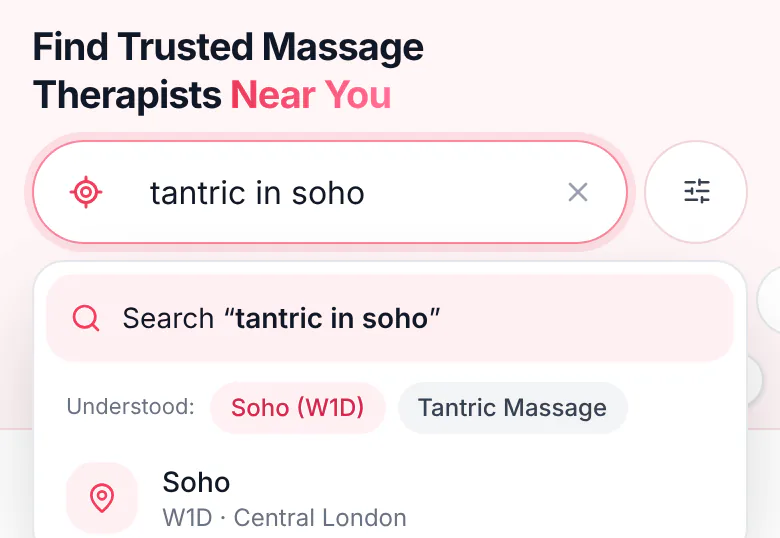
The homepage now has one search box for plain words. It already understands a postcode or district (“SW11”), a London area (Soho, Battersea), a city, one massage type (tantric, nuru, B2B, Thai, deep tissue and more) and extras such as today, incall, outcall, verified, male, female and agency. “Nuru outcall today soho” works, and the box shows what it understood before the client searches.
“tantric in soho”, read as Soho (W1D) plus Tantric Massage.
A fuller smart search is coming soon: stations, streets, names, age, price and more flexible combinations of filters. Meanwhile, keep your location, services and incall or outcall options accurate, because that is what the box matches. A search with “today” or “now” shows only listings with Available today switched on, so switch it on whenever you are working.
Your questions about the new order
I pay for VIP. Why am I not always first?
The two opening VIP places on the homepage rotate by weight between all the VIPs whose listing period is paid. You are still on the first page of the homepage every time, with the larger card, and in the VIP block on city, area and service pages and in search.
Why did my position on the homepage change?
The homepage is rebuilt about once a minute and whenever a listing changes, and each rebuild draws a new order for the VIPs and the Paid group. A different place a minute later is the reshuffle, not a penalty.
Does paying again move me up?
Paying for your listing period again moves you up, in two different ways. On the homepage it doubles your weight for 5 days, so you are about six times as likely to land first as a listing paid two months ago, but you still don’t get a fixed place. On city, area, service and search pages it puts you first among the paid listings, below the VIP block. Buying VIP doesn’t count as a listing payment.
What happens when my listing period ends?
Your contact details are hidden at 12:00 London time on the day it ends, and your listing drops below every paid listing, out of the reshuffle. Renew and you are back straight away, with double weight on the homepage for the next 5 days and first place among the paid listings on city, area, service and search pages.
Check when your listing period ends, renew early if you want the top weight, and switch on Available today on the days you work.